목차
1. 개요
2. 개발환경
3. 주요 클래스
4. Config 설정
5. 동작 흐름
6. 동작 결과
7. 참조
개요
Rest API 를 적용한 상태에서 JWT 방식에서 Session 방식으로 인증, 인가를 변경해야 했고,
스프링 시큐리티의 기본 설정인 Form 인증 방식을 Rest API 에 맞게 변경했던 방법을 공유하고자
포스팅을 하게 됐습니다.
개발환경
JDK 17
Spring Boot 3.1.3
Spring Security 6.1.3
DB Postgresql
JPA
테스트
- Postman
주요 클래스
필터 관련 클래스
1. CustomAuthenticationFilter
import lombok.Data;
import com.fasterxml.jackson.databind.ObjectMapper;
import jakarta.servlet.ServletException;
import jakarta.servlet.http.HttpServletRequest;
import jakarta.servlet.http.HttpServletResponse;
import org.springframework.security.core.Authentication;
import org.springframework.security.core.AuthenticationException;
import org.springframework.security.web.authentication.AbstractAuthenticationProcessingFilter;
import org.springframework.security.web.util.matcher.AntPathRequestMatcher;
import org.springframework.util.StringUtils;

import java.io.IOException;

public class CustomAuthenticationFilter extends AbstractAuthenticationProcessingFilter {

    private ObjectMapper objectMapper = new ObjectMapper();

    public CustomAuthenticationFilter() {
        // url과 일치할 경우 해당 필터가 동작합니다.
        super(new AntPathRequestMatcher("/api/login"));
    }
    @Override
    public Authentication attemptAuthentication(HttpServletRequest request, HttpServletResponse response)
            throws AuthenticationException, IOException, ServletException {

        // 해당 요청이 POST 인지 확인
        if(!isPost(request)) {
            throw new IllegalStateException("Authentication is not supported");
        }

        // POST 이면 body 를 AccountDto( 로그인 정보 DTO ) 에 매핑
        AccountDto accountDto = objectMapper.readValue(request.getReader(), AccountDto.class);

        // ID, PASSWORD 가 있는지 확인
        if(!StringUtils.hasLength(accountDto.getUsername())
                || !StringUtils.hasLength(accountDto.getPassword())) {
            throw new IllegalArgumentException("username or password is empty");
        }

        // 처음에는 인증 되지 않은 토큰 생성
        CustomAuthenticationToken token = new CustomAuthenticationToken(
                accountDto.getUsername(),
                accountDto.getPassword()
        );

        // Manager 에게 인증 처리
        Authentication authenticate = getAuthenticationManager().authenticate(token);

        return authenticate;
    }

    private boolean isPost(HttpServletRequest request) {

        if("POST".equals(request.getMethod())) {
            return true;
        }

        return false;
    }

    @Data
    public static class AccountDto {
        private String username;
        private String password;
    }

}
스프링 시큐리티는 기본적으로 Form 인증 방식을 채택하여 사용하고 있습니다.
그렇기 떄문에 Json 데이터를 매핑하기 위해 해당 필터를 커스텀하여 사용하고 있습니다.
Json Key 값은 기본적으로 username 과 password 입니다.
Security 설정에서 해당 key 값을 변경할 수 있습니다.
2. CustomUserDetail
@Data
@Entity
@Builder
@NoArgsConstructor
@AllArgsConstructor
@Table(name = "tn_user")
public class UserEntity implements UserDetails {

    @Id
    private String username;

    @Column
    private String password;

    @Column
    private String name;

    @Column
    private String role;

    @Override
    public Collection<? extends GrantedAuthority> getAuthorities() {

        List<GrantedAuthority> roles = new ArrayList<>();
        roles.add(new SimpleGrantedAuthority(role));

        return roles;
    }

    @Override
    public String getPassword() {
        return password;
    }

    @Override
    public String getUsername() {
        return username;
    }

    @Override
    public boolean isAccountNonExpired() {
        return true;
    }

    @Override
    public boolean isAccountNonLocked() {
        return true;
    }

    @Override
    public boolean isCredentialsNonExpired() {
        return true;
    }

    @Override
    public boolean isEnabled() {
        return true;
    }
}
UserDetail 을 구현한 UserEntity 입니다.
UserDetail 을 Entity와 합쳐도되고 따로 분리히서도 상관없습니다.
3. CustomUserDetailService
import lombok.RequiredArgsConstructor;
import org.springframework.security.core.userdetails.UserDetails;
import org.springframework.security.core.userdetails.UserDetailsService;
import org.springframework.security.core.userdetails.UsernameNotFoundException;
import org.springframework.stereotype.Service;

@Service
@RequiredArgsConstructor
public class CustomUserDetailsService implements UserDetailsService {

    // JPA 사용, Mybatis 사용시 mapper를 등록하셔서 user 정보를 받아오시면 됩니다.
    private final UserRepository userRepository;

    @Override
    public UserDetails loadUserByUsername(String username) throws UsernameNotFoundException {

        UserEntity entity = userRepository.findUserEntityByUsername(username)
                .orElseThrow(() -> new UsernameNotFoundException("username not found"));

        return entity;
    }
}
4. CustomAuthenticationToken
import org.springframework.security.authentication.AbstractAuthenticationToken;
import org.springframework.security.authentication.UsernamePasswordAuthenticationToken;
import org.springframework.security.core.GrantedAuthority;
import org.springframework.security.core.SpringSecurityCoreVersion;
import org.springframework.util.Assert;

import java.util.Collection;

public class CustomAuthenticationToken extends AbstractAuthenticationToken {

    private static final long serialVersionUID = SpringSecurityCoreVersion.SERIAL_VERSION_UID;

    private final Object principal;

    private Object credentials;


    // 인증 전 생성자
    public CustomAuthenticationToken(Object principal, Object credentials) {
        super(null);
        this.principal = principal;
        this.credentials = credentials;
        setAuthenticated(false);
    }

    // 인증 후 생성자
    public CustomAuthenticationToken(Object principal, Object credentials,
                                     Collection<? extends GrantedAuthority> authorities) {
        super(authorities);
        this.principal = principal;
        this.credentials = credentials;
        super.setAuthenticated(true);
    }

    @Override
    public Object getCredentials() {
        return this.credentials;
    }

    @Override
    public Object getPrincipal() {
        return this.principal;
    }

    @Override
    public void setAuthenticated(boolean isAuthenticated) throws IllegalArgumentException {
        Assert.isTrue(!isAuthenticated,
                "Cannot set this token to trusted - use constructor which takes a GrantedAuthority list instead");
        super.setAuthenticated(false);
    }

    @Override
    public void eraseCredentials() {
        super.eraseCredentials();
        this.credentials = null;
    }

}
해당 클래스는 스프링 시큐리티에서 인증 토큰으로 사용하는 AbstractAuthenticationToken 을 상속받아 만든
클래스입니다. 코드는 AbstractAuthenticationToken 와 같습니다.
5. CustomAuthenticationProvider
import lombok.RequiredArgsConstructor;
import org.springframework.security.authentication.AuthenticationProvider;
import org.springframework.security.authentication.BadCredentialsException;
import org.springframework.security.core.Authentication;
import org.springframework.security.core.AuthenticationException;
import org.springframework.security.core.userdetails.UserDetailsService;
import org.springframework.security.crypto.password.PasswordEncoder;
import org.springframework.stereotype.Component;

@Component
@RequiredArgsConstructor
public class CustomAuthenticationProvider implements AuthenticationProvider {

    private final UserDetailsService userDetailsService;
    private final PasswordEncoder passwordEncoder;

    @Override
    public Authentication authenticate(Authentication authentication) throws AuthenticationException {

        String loginId = authentication.getName();
        String password = (String) authentication.getCredentials();

        UserEntity entity = (UserEntity) userDetailsService.loadUserByUsername(loginId);

        if(!passwordEncoder.matches(password, entity.getPassword())) {
            throw new BadCredentialsException("Invalid Password");
        }

        return new CustomAuthenticationToken(entity, null, entity.getAuthorities());
    }

    @Override
    public boolean supports(Class<?> authentication) {
        return authentication.equals(CustomAuthenticationToken.class);
    }
}
위에서 구현한
CustomDetailUserService 와 UserEntity 를 사용하여 구현한 클래스 입니다.
username 과 password 를 확인하여 토큰을 생성하는 역할을 합니다.
핸들러 관련 클래스
인증 관련
1. CustomAuthenticationSuccessHandler
import com.fasterxml.jackson.databind.ObjectMapper;
import jakarta.servlet.http.HttpServletRequest;
import jakarta.servlet.http.HttpServletResponse;
import lombok.extern.slf4j.Slf4j;
import org.springframework.http.HttpStatus;
import org.springframework.http.MediaType;
import org.springframework.security.core.Authentication;
import org.springframework.security.web.authentication.AuthenticationSuccessHandler;
import org.springframework.stereotype.Component;

import java.io.IOException;

@Slf4j
@Component
public class CustomAuthenticationSuccessHandler implements AuthenticationSuccessHandler {

    private ObjectMapper objectMapper = new ObjectMapper();

    @Override
    public void onAuthenticationSuccess(HttpServletRequest request,
                                        HttpServletResponse response,
                                        Authentication authentication) throws IOException {

        UserEntity user =  (UserEntity)authentication.getPrincipal();

        response.setStatus(HttpStatus.OK.value());
        response.setContentType(MediaType.APPLICATION_JSON_VALUE);

        objectMapper.writeValue(response.getWriter(), user);
    }
}
인증 성공 Handler 입니다. Rest API 이기 때문에 redirect 처리를 하지 않고 response 에 바로 값을 넣어줍니다.
2. CustomAuthenticationFailureHandler
import com.fasterxml.jackson.databind.ObjectMapper;
import jakarta.servlet.http.HttpServletRequest;
import jakarta.servlet.http.HttpServletResponse;
import lombok.extern.slf4j.Slf4j;
import org.springframework.http.HttpStatus;
import org.springframework.http.MediaType;
import org.springframework.security.authentication.BadCredentialsException;
import org.springframework.security.authentication.CredentialsExpiredException;
import org.springframework.security.authentication.DisabledException;
import org.springframework.security.core.AuthenticationException;
import org.springframework.security.web.authentication.AuthenticationFailureHandler;
import org.springframework.stereotype.Component;

import java.io.IOException;

@Slf4j
@Component
public class CustomAuthenticationFailureHandler implements AuthenticationFailureHandler {


    private ObjectMapper objectMapper = new ObjectMapper();

    @Override
    public void onAuthenticationFailure(HttpServletRequest request,
                                        HttpServletResponse response,
                                        AuthenticationException exception) throws IOException {

        String errMsg = "Invalid Username or Password";

        response.setStatus(HttpStatus.UNAUTHORIZED.value());
        response.setContentType(MediaType.APPLICATION_JSON_VALUE);

        if(exception instanceof BadCredentialsException) {
            errMsg = "Invalid Username or Password";
        } else if(exception instanceof DisabledException) {
            errMsg = "Locked";
        } else if(exception instanceof CredentialsExpiredException) {
            errMsg = "Expired password";
        }

        objectMapper.writeValue(response.getWriter(), errMsg);
    }
}
인증 실패 Handler 입니다.
인증과정에서 발생한 예외에 맞게 에러 메세지를 만들어 body에 담아서 보냅니다.
인가 관련
1. CustomLoginAuthenticationEntrypoint
import jakarta.servlet.http.HttpServletRequest;
import jakarta.servlet.http.HttpServletResponse;
import org.springframework.security.core.AuthenticationException;
import org.springframework.security.web.AuthenticationEntryPoint;
import org.springframework.stereotype.Component;

import java.io.IOException;

@Component
public class CustomLoginAuthenticationEntryPoint implements AuthenticationEntryPoint {
    @Override
    public void commence(HttpServletRequest request,
                         HttpServletResponse response,
                         AuthenticationException authException) throws IOException {
        response.sendError(HttpServletResponse.SC_UNAUTHORIZED, "UnAuthorized");
    }
}
권한이 없을경우 해당 EntryPoint 를 탑니다.
2. CustomAccessDeniedHander
import jakarta.servlet.http.HttpServletRequest;
import jakarta.servlet.http.HttpServletResponse;
import org.springframework.security.access.AccessDeniedException;
import org.springframework.security.web.access.AccessDeniedHandler;
import org.springframework.stereotype.Component;

import java.io.IOException;

@Component
public class CustomAccessDeniedHandler implements AccessDeniedHandler {
    @Override
    public void handle(HttpServletRequest request, HttpServletResponse response,
                       AccessDeniedException accessDeniedException) throws IOException {
        response.sendError(HttpServletResponse.SC_FORBIDDEN, "Access is denied");
    }

}
요청 거부 당했을 경우 해당 Handler 를 탑니다.
DB 정보
password 는 BCryptPasswordEncoder 를 사용하였습니다.

Config 설정
config 설정은 스프링 시큐리티 버전마다 다릅니다.
해당 버전에 맞게 조각만 맞춰주시면 됩니다.
import lombok.RequiredArgsConstructor;
import org.springframework.context.annotation.Bean;
import org.springframework.context.annotation.Configuration;
import org.springframework.security.authentication.AuthenticationManager;
import org.springframework.security.config.annotation.authentication.configuration.AuthenticationConfiguration;
import org.springframework.security.config.annotation.web.builders.HttpSecurity;
import org.springframework.security.config.annotation.web.configuration.EnableWebSecurity;
import org.springframework.security.config.annotation.web.configurers.AbstractHttpConfigurer;
import org.springframework.security.crypto.bcrypt.BCryptPasswordEncoder;
import org.springframework.security.crypto.password.PasswordEncoder;
import org.springframework.security.web.SecurityFilterChain;
import org.springframework.security.web.authentication.UsernamePasswordAuthenticationFilter;
import org.springframework.security.web.context.DelegatingSecurityContextRepository;
import org.springframework.security.web.context.HttpSessionSecurityContextRepository;
import org.springframework.security.web.context.RequestAttributeSecurityContextRepository;

@Configuration
@EnableWebSecurity
@RequiredArgsConstructor
public class SecurityConfig{

    private final CustomAuthenticationSuccessHandler customAuthenticationSuccessHandler;
    private final CustomAuthenticationFailureHandler customAuthenticationFailureHandler;
    private final CustomLoginAuthenticationEntryPoint authenticationEntryPoint;
    private final AuthenticationConfiguration authenticationConfiguration;
    private final CustomAccessDeniedHandler accessDeniedHandler;

    @Bean
    public PasswordEncoder passwordEncoder(){
        return new BCryptPasswordEncoder();
    }

    @Bean
    public SecurityFilterChain securityFilterChain(HttpSecurity http) throws Exception {

        http
                .csrf(AbstractHttpConfigurer::disable)
                .cors(AbstractHttpConfigurer::disable)
                .authorizeHttpRequests(request -> request
                        .requestMatchers("/api/**").authenticated()
                        .anyRequest().permitAll())
                .addFilterBefore(ajaxAuthenticationFilter(), UsernamePasswordAuthenticationFilter.class)
                .exceptionHandling(config -> config
                        .authenticationEntryPoint(authenticationEntryPoint)
                        .accessDeniedHandler(accessDeniedHandler));

        return http.build();
    }

    @Bean
    public CustomAuthenticationFilter ajaxAuthenticationFilter() throws Exception {
        CustomAuthenticationFilter customAuthenticationFilter = new CustomAuthenticationFilter();
        customAuthenticationFilter.setAuthenticationManager(authenticationManager());
        customAuthenticationFilter.setAuthenticationSuccessHandler(customAuthenticationSuccessHandler);
        customAuthenticationFilter.setAuthenticationFailureHandler(customAuthenticationFailureHandler);

        // **
        customAuthenticationFilter.setSecurityContextRepository(
                new DelegatingSecurityContextRepository(
                        new RequestAttributeSecurityContextRepository(),
                        new HttpSessionSecurityContextRepository()
                ));

        return customAuthenticationFilter;
    }

    @Bean
    public AuthenticationManager authenticationManager() throws Exception {
        return authenticationConfiguration.getAuthenticationManager();
    }

}
** 해당 부분은 Rest API 방식을 사용하기 위해 추가해줍니다.
Form Login 방식은 기본적으로 DelegatingSecurityContextRepository 가 설정되어있지만, Custom 한 필터에는 설정되어있지 않고 RequestAttributeSecurity 가 설정되어있습니다.
RequestAttributeSecurity 는 세션을 저장 하지 않기 때문에 로그인 후 API 요청시 Anonymous 토큰이 생성되게 됩니다.
동작 흐름
동작 흐름은 다음과 같습니다.
1. CustomAuthenticationFilter 에서 설정한 URL 로 사용자가 요청을 하면 해당 필터가 요청을 가로챕니다.
2. 여기서 인증되지 않은 CustomAuthenticationToken 을 생성하고, AuthenticationManager 에게 인증처리를
요청합니다. 여기서 Token 에 사용자가 건낸 아이디와 패스워드를 보관합니다.
3. AuthenticationManger 는 우리가 AuthenticationProvider 에게 인증처리를 건냅니다.
여기서 우리가 만든 CustomAuthenticationProvider 가 동작합니다.
4. CustomAuthenticationProvider 에서 CustomUserDetailsService 로 DB 에 있는 User 정보를 가져와
AuthenticationToken 에 저장한 사용자 정보가 일치하는지 확인하여 일치하면 SuccessHandler 를 실패 하면 FailedHandler 를 실행합니다. 여기까지 과정중에 에러가 발생하면 FailedHandler 로 가게됩니다.
5. 인증 성공 후 기본 로직에 의해 인가 확인을 합니다.
( url을 등록하고 hasRole("USER") 와 같이 설정하였을때, 인가 확인을 합니다. )
6. 인가 실패시 경우에 따라 해당 Handler 를 실행합니다.
CustomLoginAuthenticationEntrypoint
CustomAccessDeniedHander
인증 성공시 거치지 않음.
실행 결과
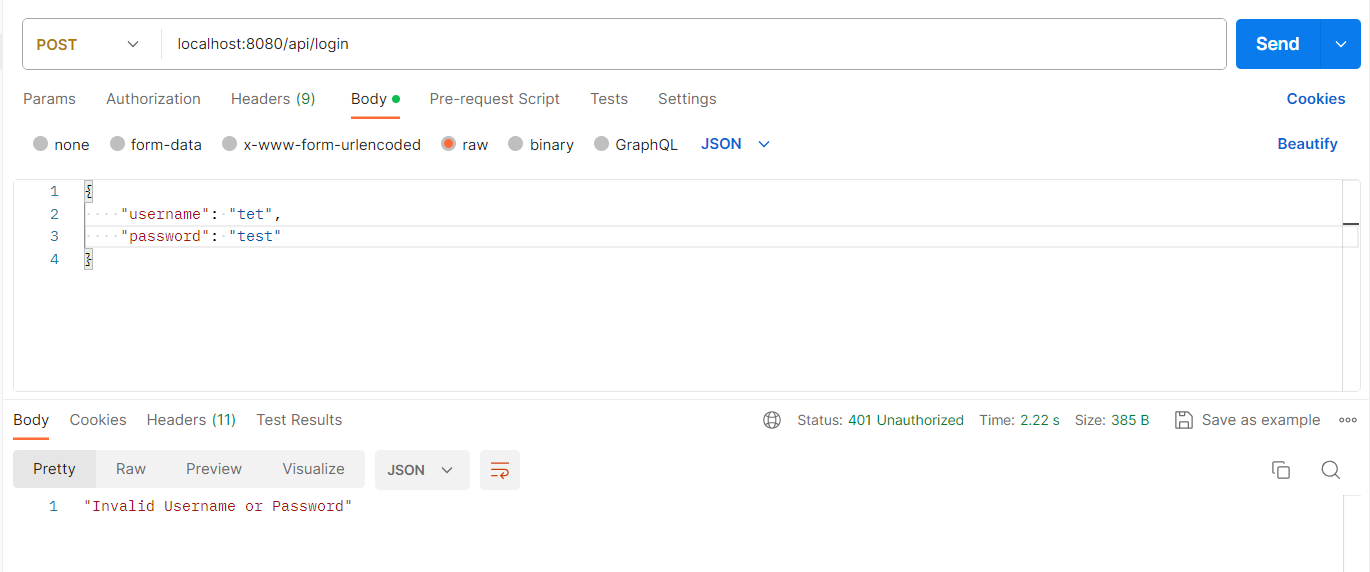
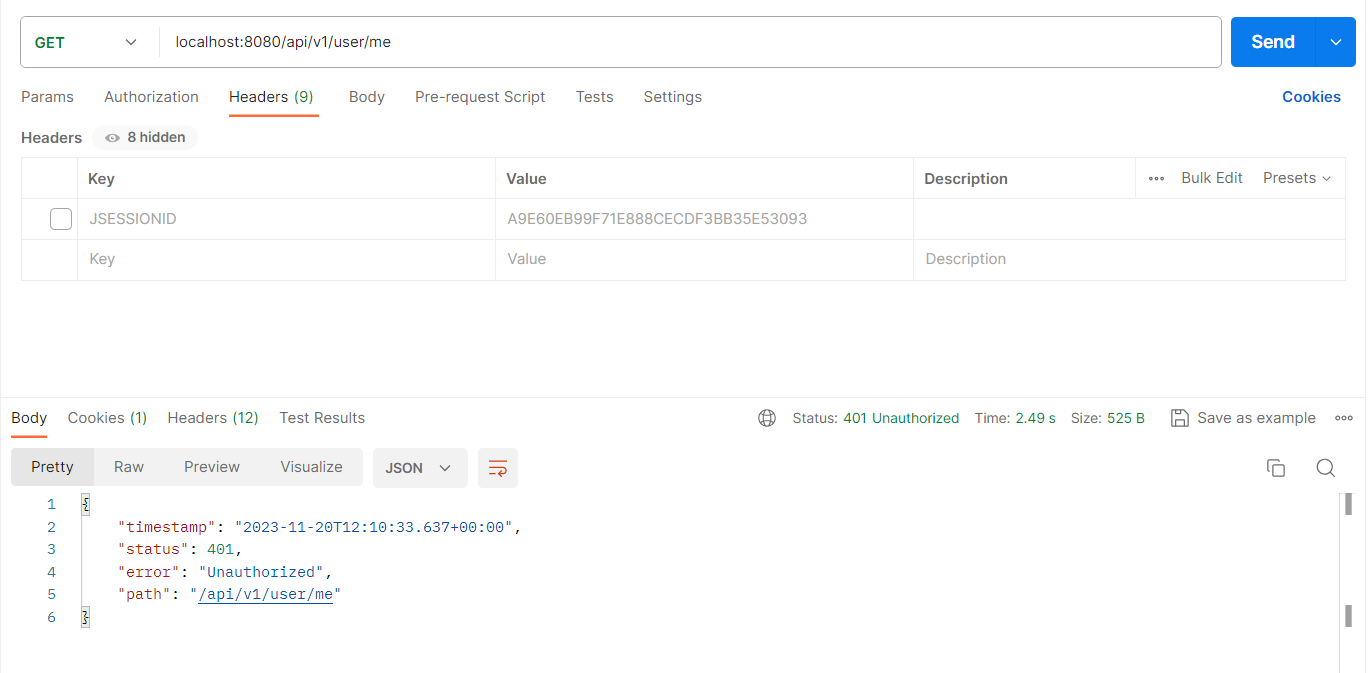
로그인 정보
아이디 test
비밀번호 test
PostMan 사용
1. 잘못된 아이디 또는 비밀번호 입력시
2. 로그인 성공

3. 권한 없는 URL 요청 시
참조
인프런 - 정수원님 스프링시큐리티 강의
'Spring Boot' 카테고리의 다른 글
| Error creating bean with name 'entityManagerFactory' defined in class path resource 에러 (0) | 2024.03.23 |
|---|---|
| Spring Boot + Spring Security 로 JWT 로그인 방식 구현 (2) | 2023.12.06 |
| Spring boot 로 구글 클라우드 저장소(GCS) 에 파일 업로드 하기 (1) | 2023.11.07 |
| 스프링 시큐리티 적용하기 (0) | 2023.11.05 |
| controller 호출 전 Request body 값 읽기 (1) | 2023.10.29 |


